


• Buy it once. It's yours. No subscription. Nothing to cancel, nothing to renew. $59.99 or $79.99 USD, one time.
  • No signal? No problem. Quote and invoice in basements, crawl spaces and on back roads.
  • Your data, your phone. No account and no Q-SPAN server. Your clients and numbers stay with you.

Quote it. Book it. Bill it. …all from your phone!

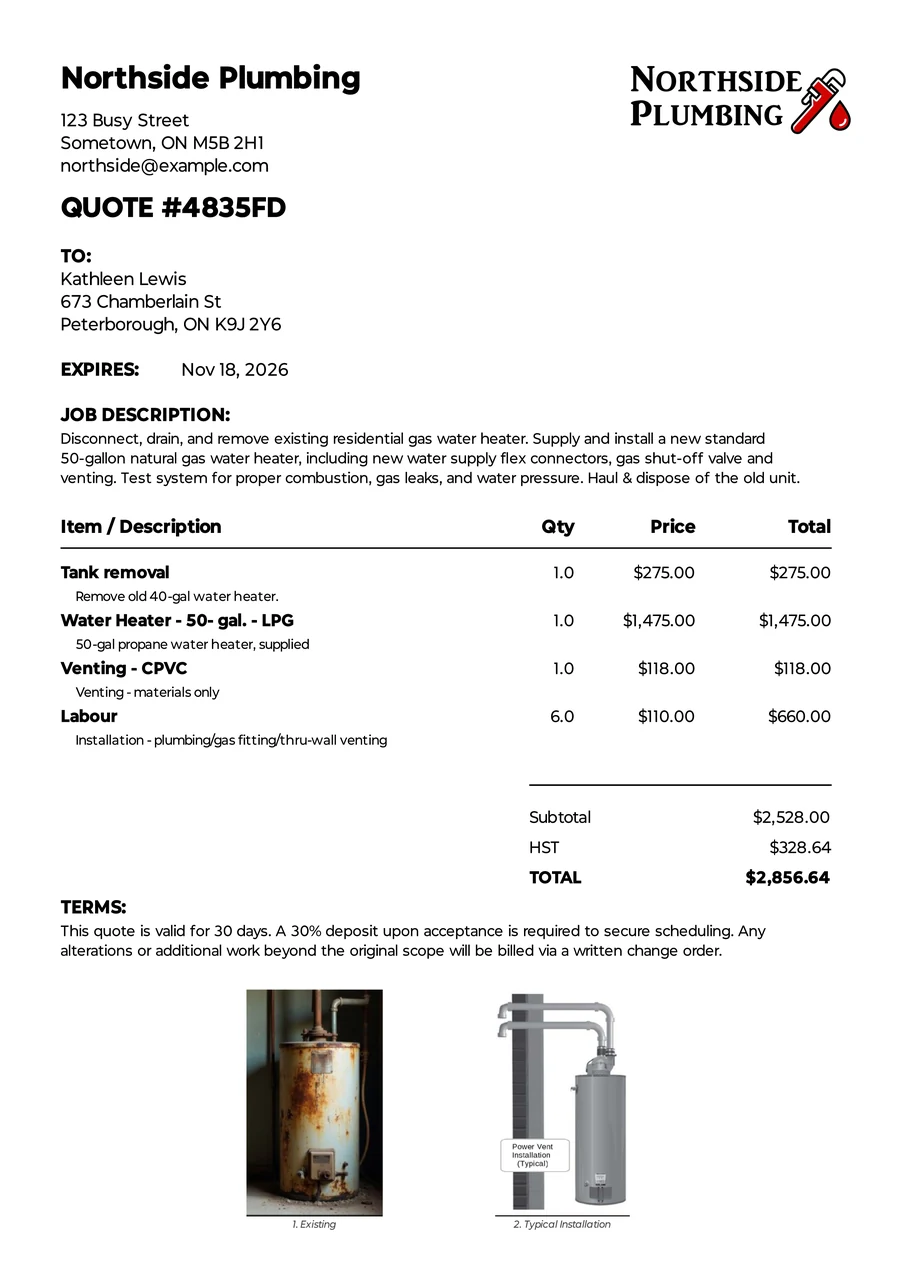
The PDF quote the client receives: business logo, client address, line items, HST, total, terms and two photos.
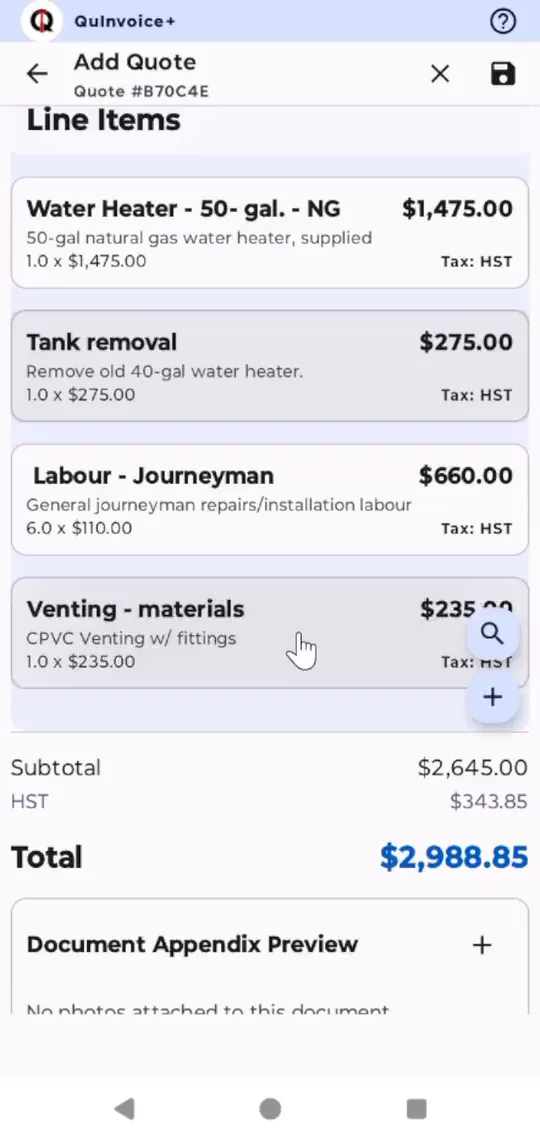
In the app, and as the PDF your client gets.

The business app for contractors and tradespeople. Build a quote in the client's kitchen, turn it into a job or an invoice when they say yes, and have your follow-ups written and ready to send.

Try the full Q-SPAN+ free. Run 5 jobs start to finish: 5 quotes, 5 invoices, every feature.

Coming to Google Play in December 2026

Android phones and tablets. Then $59.99 or $79.99 USD, once.

Everything you juggle now, on the phone you already carry.

Four ways a small business usually keeps track. Q-SPAN replaces all of them with one app.

  • Instead of Paper quote pad in the truck Quotes built on site and sent as a branded PDF
  • Instead of Calendar on the shop wall Jobs booked straight from the accepted quote+
  • Instead of Handwritten invoices, or invoicing software back at the office Invoices made from the quote or job, right on site
  • Instead of Sticky notes to chase payments Payment reminders written and queued. You tap Send.

Nothing gets typed twice.

Every client, quote, job and invoice is linked. Open an invoice and jump straight back to its job, its quote and the client. Start wherever the work starts.

The full chain Client Quote Job+ Invoice Payment

Four ways in

Quote first, then book it Quote Job Invoice
Skip the job Quote Invoice
A job with no quote Job Invoice
Just an invoice Invoice

Jobs and scheduling are part of Q-SPAN+

How a job runs in Q-SPAN

  1. Quote it

    Standing on site, tap items from your Pricebook, snap photos and ask for a deposit. The client gets a branded PDF before you leave.

    Build a quote and send it

    1. Select a client.
    2. Enter a job description.
    3. Add items from catalog.
    4. You can drag to rearrange items.
    5. Add photos.
    6. Generate and send the quote!
  2. Book it +

    When they say yes, accept the quote and schedule it as a job in the same step. An appointment reminder is written and waiting for you to send.

    Screenshot to come Accepting a quote: invoice it or schedule the job
  3. Bill it

    One tap turns the job or quote into an invoice, with the deposit already credited. Due-date and overdue reminders line up on schedule; you check them and tap Send.

    Screenshot to come An invoice with its reminders queued

What's in the app

Features marked + come with Q-SPAN+. Everything else is in both versions.

Quote it

Price the job while you're still standing in it.

  • Quotes in minutes, on site

    Tap items from your Pricebook, add photos, and send a branded PDF before you leave the driveway.

  • Pricebook and quote templates

    Save your rates, parts and section headings once. Start common jobs from a template, and drag lines into the order you want.

  • Deposits

    Ask for a deposit on the quote. Record it when it's paid, and it comes off the invoice automatically.

  • Photos where they matter

    Attach photos to a line item or the whole document. The PDF adds a photo appendix tied to each line.

Book it

Turn a yes into a date on the calendar.

  • Job Schedule +

    Calendar, list and month views. Accept a quote and schedule it as a job in the same step.

  • Business hours +

    Q-SPAN warns you before booking outside your hours, and offers to split a multi-day job across your working days.

  • Appointment reminders +

    A reminder for every upcoming job, written and waiting for you to send.

  • On-site job photos +

    Photos you take on the job follow it onto the invoice.

Bill it

Get the invoice out the same day the work is done.

  • One tap to an invoice

    Accepted quotes and finished jobs become invoices with the client, address and line items already filled in.

  • Send it your way

    Email, text, WhatsApp, or any app on your phone, with your own message templates.

  • Follow-ups written for you

    Quote follow-ups, due-date and overdue reminders are written and queued on schedule. You check them and tap Send.

  • Payments, partial or full

    Record payments as they come in and send a receipt. Void a mistake without breaking your invoice numbers.

Keep track

See what you've billed, what you're owed and what's coming.

  • Dashboard

    Revenue, money owed, open quotes, and what needs your attention today.

  • Money and sales reports

    Who owes what and for how long, cash flow, sales tax collected, your win rate, and why quotes get turned down.

  • Workload reports +

    How booked your week is, which jobs are stalled, and how far final invoices drift from the quote.

  • Import and export +

    Bring in clients and your price list from CSV files. Send your financials to Google Sheets for your accountant.

Your data

It lives on your phone, and it's yours.

  • Encrypted backups

    AES-256 backups saved on your phone, locked with a passphrase only you know.

  • Cloud Sync +

    Back up to your own Google Drive and restore everything on a new phone.

  • Your look

    Your logo on every quote, invoice and receipt. Light or dark mode and 10 color palettes in the app.

  • Q-SPAN Desk

    A free Windows app for working at a big screen with a mouse and keyboard. The data stays on your phone.

    About Q-SPAN Desk

Pay once. It's yours.

No monthly bill and nothing to cancel. Both versions are one-time purchases inside the free app.

Q-SPAN

$59.99 USD, one time

Quote from the field, invoice, and keep payments on track with follow-ups written for you.

  • Unlimited clients, quotes and invoices
  • Pricebook, templates, deposits and photos
  • Quote and invoice reminders
  • Dashboard and reports
  • Encrypted backups

Recommended

Q-SPAN+

$79.99 USD, one time

Everything in Q-SPAN, plus the schedule that ties it all together.

  • Job Schedule and business hours
  • Job appointment reminders
  • On-site job photos that follow the job to the invoice
  • Cloud Sync to your Google Drive
  • CSV import and Google Sheets export

Start free with the full Q-SPAN+: 5 quotes and 5 invoices, start to finish.

Coming to Google Play in December 2026

Prices in USD. Google Play shows the price in your currency.

Side by side

FeatureQ-SPANQ-SPAN+
Unlimited clients, quotes and invoices ✓ ✓
Pricebook, product groups, quote templates, tax rates, payment terms ✓ ✓
Deposits on quotes, credited on the invoice ✓ ✓
Branded PDFs and receipts, with photos by line item or appendix ✓ ✓
Send by email, text or WhatsApp, with message templates ✓ ✓
Quote and invoice reminders, written and queued for you to send ✓ ✓
Accepted quote becomes an invoice ✓ ✓
Partial payments, receipts, and voids that keep invoice numbers in order ✓ ✓
Dashboard, money and sales reports ✓ ✓
Encrypted local backups ✓ ✓
Light and dark mode, 10 color palettes ✓ ✓
Q-SPAN Desk for Windows (free) ✓ ✓
Accepted quote becomes a scheduled job – ✓
Job Schedule, business hours, out-of-hours warnings, multi-day splitting – ✓
Job appointment reminders – ✓
On-site job photos carried into the invoice – ✓
Invoice from a completed job, Today's Agenda and Ready to Invoice – ✓
Workload reports: capacity, fulfillment, job slippage – ✓
Cloud Sync to Google Drive, restore on a new phone – ✓
CSV import of clients and price list, export to Google Sheets – ✓
One-time price (USD) $59.99 $79.99

Your phone. Your data.

Q-SPAN has no server and no account to sign up for. Your business records live on the device you carry to every job.

  • Works with no signal

    Quote in a basement or a field. You only need a connection to send a document or back up to the cloud.

  • Locked with your passphrase

    Backups are AES-256 encrypted with a passphrase only you know. Nobody can reset it, including us, so keep it somewhere safe.

  • Your own Google Drive +

    Cloud Sync backs up to your Google account and restores everything on a new phone.

  • A big screen when you want one

    Q-SPAN Desk is a free Windows app. Use a mouse and keyboard over your Wi-Fi while the data stays on the phone. Get Q-SPAN Desk

What Q-SPAN isn't

  • Not accounting software. It handles quotes, jobs, invoices and payments. Your accountant still keeps the books, with clean numbers from you.
  • Not a team app. One user and one business per phone.
  • Not on iPhone. Q-SPAN runs on Android phones and tablets.
  • Not going behind your back. Reminders are written for you, but nothing goes to a client until you tap Send.

Learn it in short videos

A 24-part series walks through setup, quoting, scheduling, invoicing and reports.

Questions before you install

Is there a monthly fee?

No. Q-SPAN is a one-time purchase through Google Play: $59.99 for Q-SPAN or $79.99 for Q-SPAN+ (USD; Google Play shows your local price). Nothing renews, so there's nothing to cancel.

How does the free trial work?

Install Q-SPAN for free and you get the full Q-SPAN+, scheduling included, for up to 5 quotes and 5 invoices. That's enough to run 5 jobs start to finish. Your trial records stay when you buy.

Does it work without internet?

Yes. Q-SPAN runs entirely on your phone, so you can quote in a basement or a field. You only need a connection to send a document, back up to Google Drive or export to Google Sheets.

Can I move to a new phone?

Yes. Restore from an encrypted backup file, or with Q-SPAN+, restore straight from your Google Drive.

Is it available on iPhone?

Not right now. Q-SPAN is for Android phones and tablets.

Your next quote could be done before you leave the driveway.

Try the full Q-SPAN+ free. Run 5 jobs start to finish: 5 quotes, 5 invoices, every feature.

Coming to Google Play in December 2026